D1 Has No Down Migrations: A Forward-Only Recovery Strategy
# The Wrangler D1 migration CLI has no down command. Use forward fixes, whole-database Time Travel, and schema compatibility without rewriting history.
Cloudflare D1's migration system creates, lists, and applies numbered SQL files.
The Wrangler migration CLI has no down command.
Applied filenames are recorded in d1_migrations and excluded from later apply plans.
D1 Time Travel can still restore the whole database to an earlier point.
Those are different operations: there is no dedicated down migration for reversing one schema file, but there is a destructive whole-database recovery mechanism.
Confusing them leads either to the false claim that recovery is impossible or to using a full restore for a small schema correction.
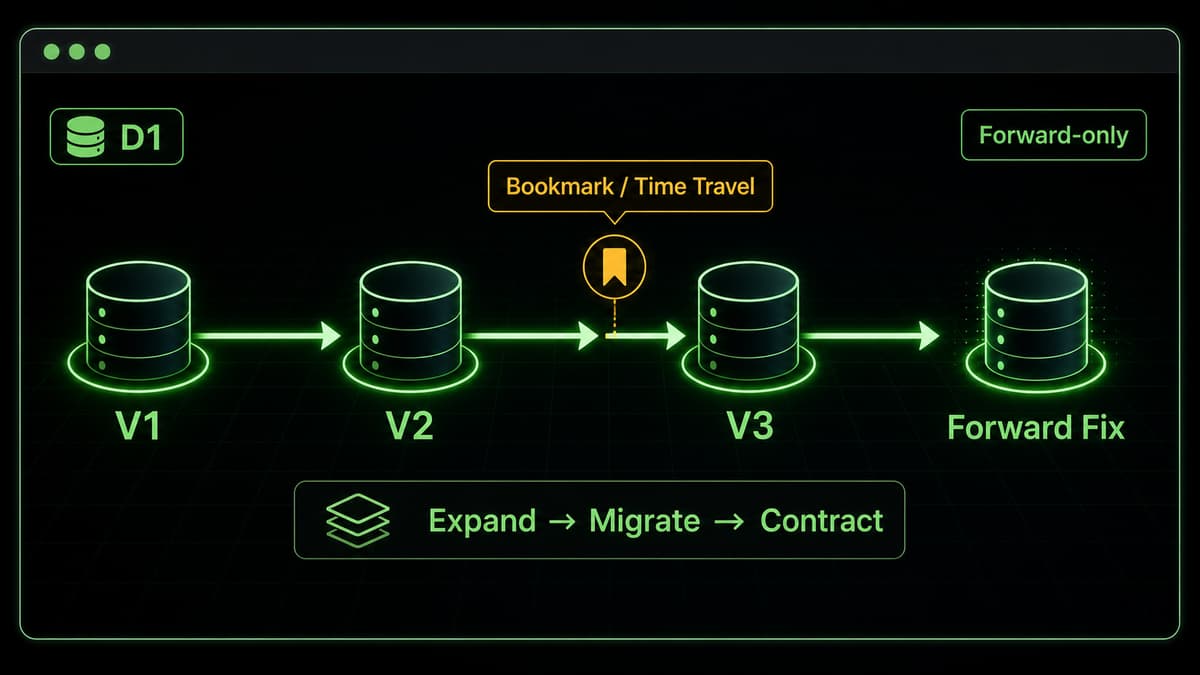
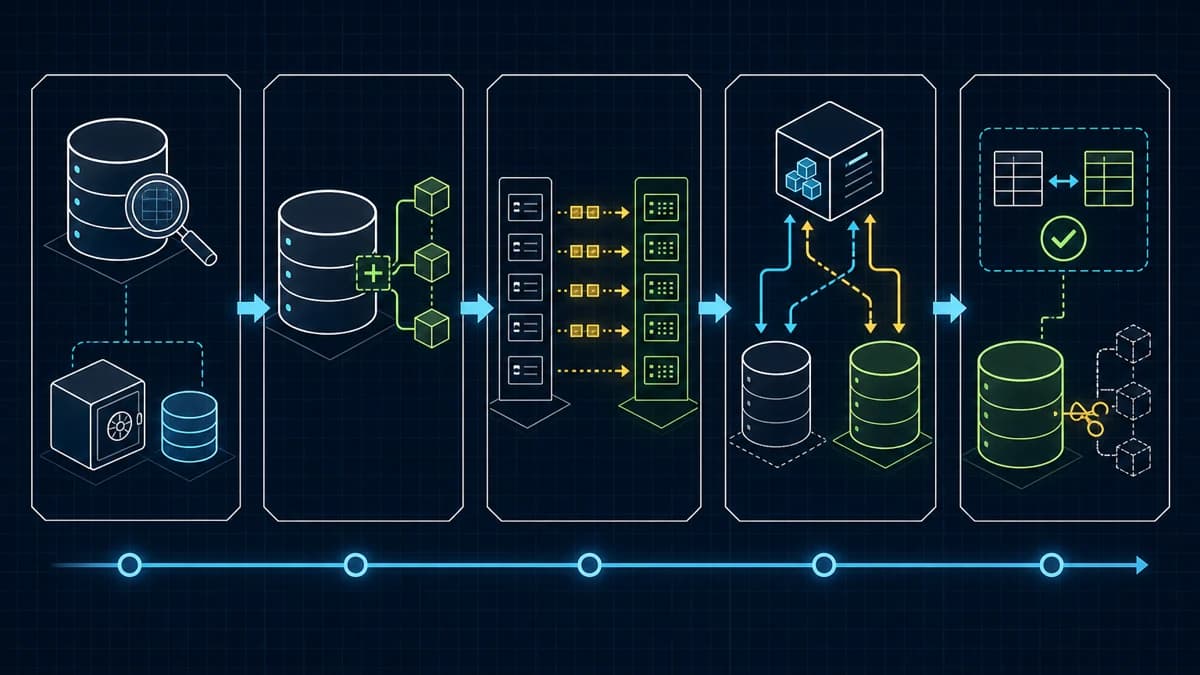
A safe D1 migration sequence from preflight and a bookmark through expand, migrate, verification, and a later contract
*Diagram: preserve compatibility through expand and migrate, contract only in a later release, and reserve a bookmark restore for a severe incident.*
Separate three recovery mechanisms
The normal first choice is a new forward migration.
It can repair a missing index, trigger, column, or data transformation without discarding writes that arrived after the original deployment.
If only Worker code is faulty and the previous code remains compatible with the current schema, deploying the previous Worker version is another option.
That option disappears when a schema change has already broken backward compatibility, which is why the compatibility window matters.
D1 Time Travel restore replaces the whole database with its state at a selected bookmark.
It cancels in-flight queries and transactions, and it discards writes after the bookmark.
Use it only for a severe incident where that loss is accepted: stop writes, verify the database and bookmark, then restore.
Save the bookmark returned by the completed restore because it can be used to undo the restore itself.
Do not reapply the incident migration after a restore
Restoring a pre-migration bookmark also restores d1_migrations to that point.
The incident migration becomes pending again in the remote plan.
Immediately after restore, keep migration automation paused and inspect wrangler d1 migrations list ... --remote read-only.
Never blindly reapply the incident migration.
Capture the restored schema, migration history, pending files, and which other environments applied them.
Validate a reviewed recovery/re-baseline plan against a local copy before any normal apply resumes.
There is no universally safe restart command.
If the baseline is unclear, keep writes stopped and ask Cloudflare Support rather than manually mutating d1_migrations or executing remote down SQL.
Keep migration history immutable
d1_migrations is operational evidence of which files were applied.
We never mutate its rows manually.
After a migration is applied, we also leave that numbered file unchanged and add a new numbered migration for any correction.
Files under migrations/rollback/*.down.sql are not production down migrations.
They are a local-only review and test fixture for understanding destructive effects and the data a reversal would lose.
Only changes that benefit from that review need one, and any fixture is exercised against a local database.
The authoritative procedure in this repository is migrations/README.md.
Write each migration for one recorded application
ALTER TABLE ... ADD COLUMN fails when the same column already exists.
D1 uses migration history to select an unapplied file and applies that file once.
A guarded WHERE or NOT EXISTS can prevent accidental data overwrites, but it does not make the entire schema file safe to run repeatedly.
sql
-- expand: an additive change that old code can ignoreALTER TABLE posts ADD COLUMN title_en TEXT NOT NULL DEFAULT '';-- migrate: a bounded backfill that preserves an existing translationUPDATE postsSET title_en = titleWHERE title_en = '';
Before remote work, apply the migration to local D1 and test the schema, important queries, row counts, and backfill result.
Wrangler rolls back the migration that fails during apply, but it does not undo earlier migrations that already succeeded.
Split expand → migrate → contract across releases
Do not compress a risky schema transition into one deployment.
expand: add a column, table, or index that old code can ignore.
migrate: deploy new code with dual-read or dual-write compatibility and backfill data.
verify: observe old and new paths, row counts, nulls, indexes, and critical queries.
contract: remove an old column or trigger in a separate migration after the compatibility window.
A Worker version switch and a D1 migration do not complete atomically.
The old Worker must tolerate the expanded schema, while the new Worker must tolerate rows that have not yet been backfilled.
Do not claim that either order is universally safe; document the version/schema combinations accepted by each release.
Capture the bookmark immediately before remote apply
This repository uses the following order.
Remote commands run only after the target, pending files, and explicit approval have been checked.
bash
# 1. Apply locally and run focused testspnpm run d1:migrate:local# 2. Review the remote migration planpnpm exec wrangler d1 migrations list kirin-ai-blog-db --remote# 3. After approval, stop writes and save the pre-apply bookmarkpnpm exec wrangler d1 time-travel info kirin-ai-blog-db --json# 4. Recheck the database and pending files, then applypnpm run d1:migrate:remote
If a whole-database restore is justified, the command has this shape after its impact is confirmed.
Export and application backup solve different problems
wrangler d1 export is useful, but Cloudflare's documentation says export does not support a database containing virtual tables.
This site uses FTS5 virtual tables, so export is not the primary full-production-database recovery mechanism.
Export also blocks database queries while it runs, so its runtime matters.
The admin backup moves articles and marketing settings as an application-data snapshot.
It is not a full D1 backup of comments, likes, rate-limit state, or migration history.
Use Time Travel for point-in-time recovery of the production database, a forward migration when recent writes must remain, and the admin backup for application-content transfer.
Incident decision order
Apply itself failed: inspect the error and validate a correction locally; do not edit migration history.
Apply succeeded and recent writes must remain: deploy compatible app code or add a new forward migration.
The whole database is damaged and losing writes after the bookmark is accepted: stop writes and use Time Travel restore.
Old code is requested after contract: if it cannot use the current schema, reject the code rollback and prefer a forward fix.