Image Delivery with Next.js 16, Vinext, and Cloudflare R2
# Trace the production media pipeline from authenticated upload and WebP conversion through temporary R2, D1 claims, content-hash promotion, and same-origin delivery.
The hard part of an image-enabled CMS is not adding an upload button.
Authentication, transformation, temporary storage, post persistence, reference tracking, delivery, and browser verification must succeed as one pipeline before an image is truly published.
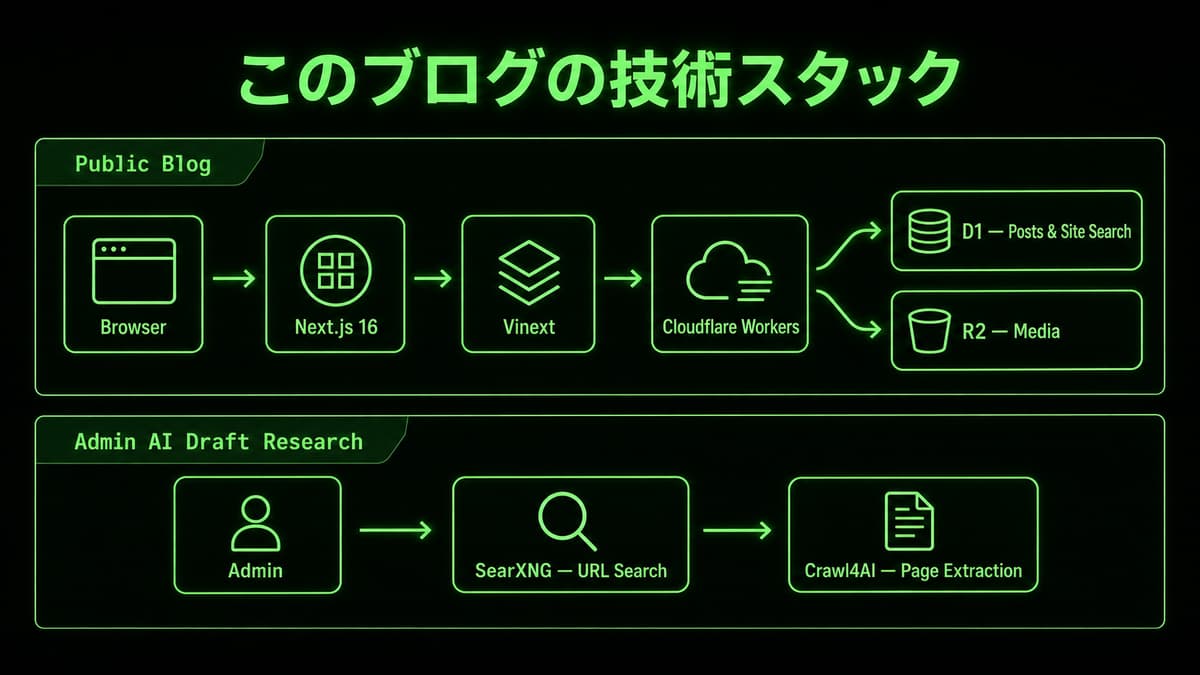
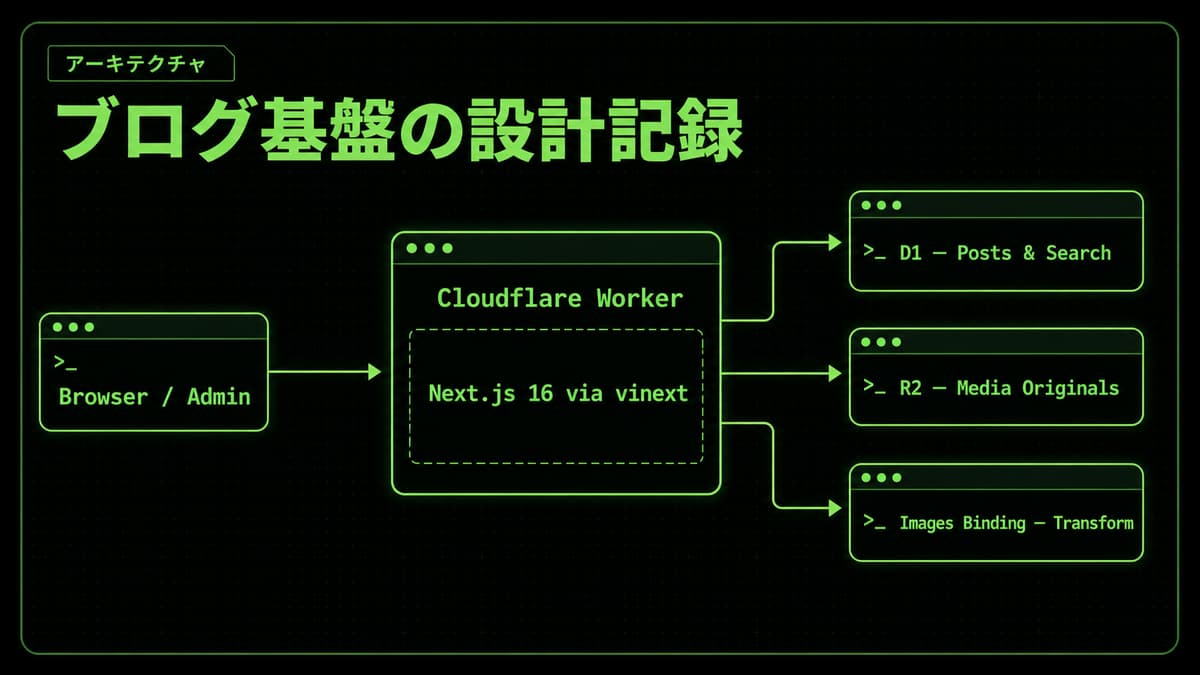
This site runs the Next.js 16 API surface through vinext on Vite and Cloudflare Workers.
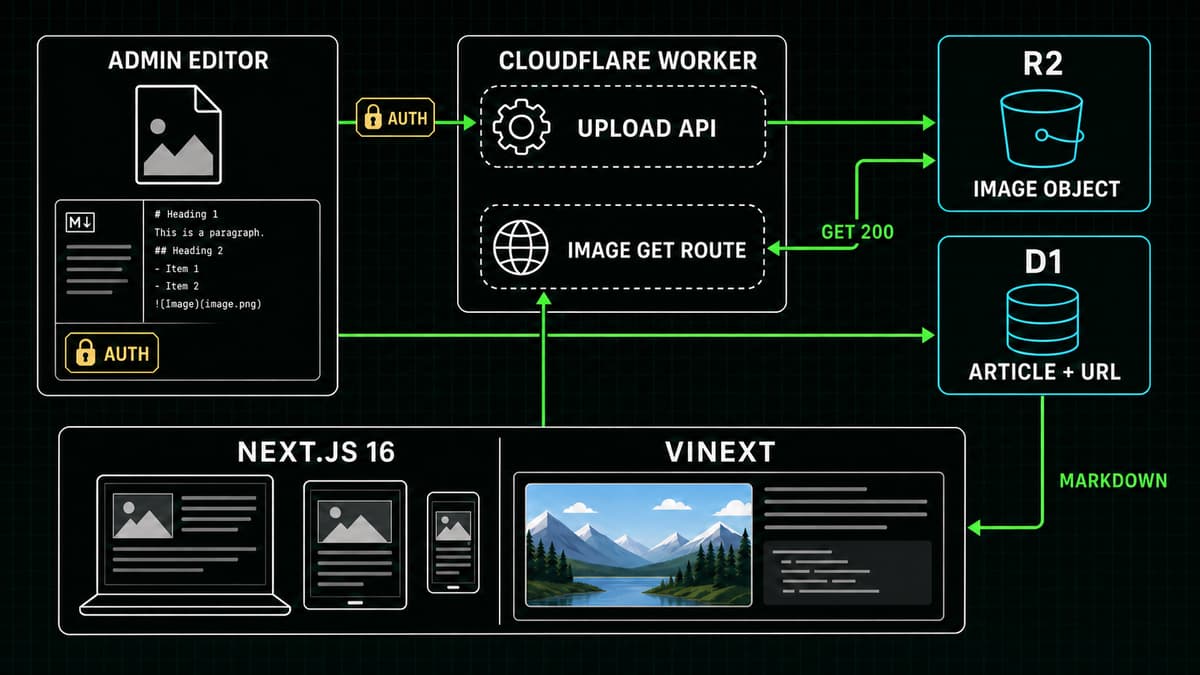
Body images are normalized to WebP with the Cloudflare Images binding. Covers generated by Codex App Server or uploaded by an administrator remain PNG. Both live in a private R2 bucket.
D1 tracks post data, media metadata, and references from posts to objects.
Browsers receive the bytes through a same-origin route.
Separate build-time assets from CMS media
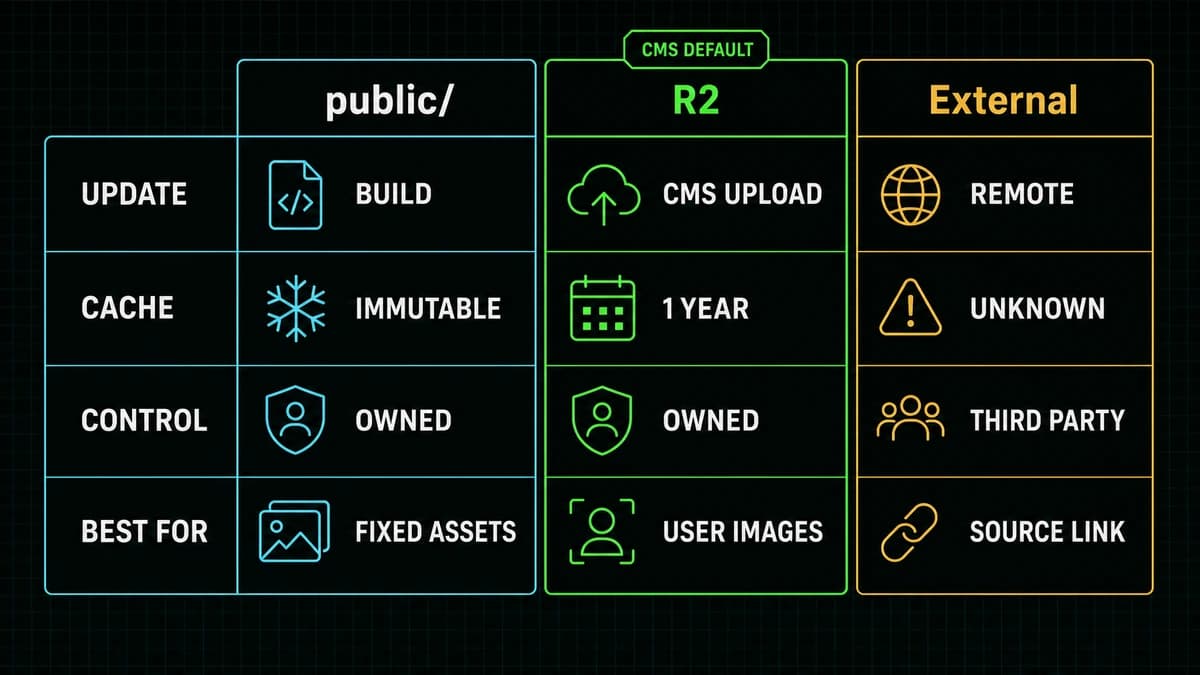
Choose storage according to who updates the image.
public/: editorial diagrams reviewed with source and fixed at deployment time
R2: body images and PNG covers uploaded or generated from the administration console
External URL: retained as a citation link, not used as the image delivery origin
A public/ asset is easy to review in Git and ships with the same deployment as the page, but adding one requires another build and deploy.
R2 can be written through a Worker binding and therefore fits CMS operations.
Hotlinking a foreign image makes the article depend on deletion, terms, latency, and tracking outside this site's control, so this implementation does not use it.
Comparison of public assets, R2, and external URLs
The External column in the diagram means retaining a source link.
The current renderer does not accept foreign hosts as image src.
After publication rights are verified, an image is imported into the site's R2 bucket while its source remains a normal link.
Authenticate before reading the upload body
The entry points are POST /api/media/upload for body images and POST /api/thumbnails/upload for covers.
Both routes complete administrator authentication before calling formData().
They do not parse an untrusted large request body before deciding whether the caller may upload.
Content-Length is an optional preflight signal.
This implementation adds a 64 KiB multipart framing allowance to the 5 MiB file limit and rejects only clearly oversized request bodies before formData().
A missing header is not itself an error, and a forged header does not bypass the authoritative check against actual file bytes.
The authoritative decision reads the actual bytes and checks that they are no larger than 5 MiB.
Both the original and transformed output are bounded, and empty files are rejected.
Body-image inputs may be JPEG, PNG, WebP, or GIF. They are scaled down to at most 1,600 pixels wide and emitted as WebP at quality 82.
Covers reject SVG, JPEG, WebP, and GIF. They must come from Codex App Server gpt-image-2 or a PNG upload, are cover-cropped to 1200 × 675, and remain image/png.
The pipeline does not trust a MIME label alone: it checks PNG/JPEG/WebP/GIF signatures before and after transformation and verifies the response Content-Type. Post create, patch, and backup restore accept only site-relative .png cover references.
If the Images binding is missing, the route fails closed instead of storing unnormalized bytes.
Create a temporary object first
The normalized output receives a SHA-256 digest.
Because it is not attached to a saved post yet, its first key has this shape:
text
tmp/uploaded/<uuid>.webp # body imagetmp/<generated|uploaded>/<uuid>.png # AI-generated or uploaded cover
Object metadata uses Content-Type: image/webp or image/png to match the stored bytes. Both temporary forms use Cache-Control: private, no-store.
A GET for /api/thumbnails/tmp/... requires an administrator session, so a temporary URL cannot become a shared public cache entry.
At the same time, D1 creates a capacity lease in media_storage_reservations and a temporary row in media_assets.
Reservation consumption and metadata insertion run in a D1 batch; a half-registered asset is rejected.
If the R2 put fails, the code cleans up temporary metadata and the reservation instead of leaving ghost quota usage.
Promote on post save with a content-hash key
A successful upload is not yet public media.
When the post is saved, prepareMediaForPost extracts managed URLs from the body and cover fields, then promotes each temporary asset to this permanent key:
text
media/<sha256>.webp # body imagemedia/<sha256>.png # cover
Identical content and MIME converge on one key. PNG stays PNG and WebP stays WebP during promotion.
A permanent object receives Cache-Control: public, max-age=31536000, immutable.
When the bytes change, the digest and URL change too, so correctness does not depend on purging an old browser or CDN entry.
The public URL is not an R2 public-bucket hostname.
It stays on this site:
text
/api/thumbnails/<key>
A stored Markdown image therefore looks like this:
markdown

Alt text should describe the information, not repeat a filename.
“Diagram showing R2 image delivery to an article” remains useful when the image cannot be seen; “image-01” does not.
Protect state and references in D1
D1 contains media_assets, post_media_refs, and the storage reservation ledger.
media_assets records the key, SHA-256, MIME type, size, source, and states such as temporary, promoting, attaching, and attached.
post_media_refs identifies which post uses which object, allowing deletion to reject media that is still in use.
A post update carries the updatedAt value observed by the editor as a precondition.
The save path claims media as attaching, then writes the post, bigram search index, reference rows, and media state in one D1 batch.
If the conditional post write changes zero rows, the claim is released.
A stale editor tab therefore cannot overwrite newer post content and its media references.
Permanent media removed from all posts moves to orphaned rather than being deleted immediately.
A cleanup job waits through a grace period, rechecks references, and records an R2 deletion failure as delete_failed for a safe retry.
Serve a private R2 bucket through one same-origin route
GET /api/thumbnails/<key> reads the object through the R2 binding and copies stored HTTP metadata to the response.
Keys under tmp/ always require administrator authentication and force private, no-store.
Permanent media/ keys are content-addressed and can return public, max-age=31536000, immutable.
The bucket itself does not need to be public.
Knowing a random temporary key is not sufficient to bypass the route's authentication.
Privacy is enforced by both the bucket configuration and the Worker route.
The next/image and vinext boundary
The article renderer sends every Markdown image URL through safeLocalImageSrc, which rejects origins other than this site.
It gives next/imagewidth={1200}, height={675}, and responsive sizes, establishing an aspect ratio before bytes arrive.
Vinext reimplements the Next.js API on Vite and connects Cloudflare image optimization to the Images binding.
This site marks only temporary images as unoptimized.
A temporary GET needs an administrator session, and routing it through an optimizer would change the credential boundary.
Permanent same-origin media and public/ assets use the normal optimization path.
Verify publication in six steps
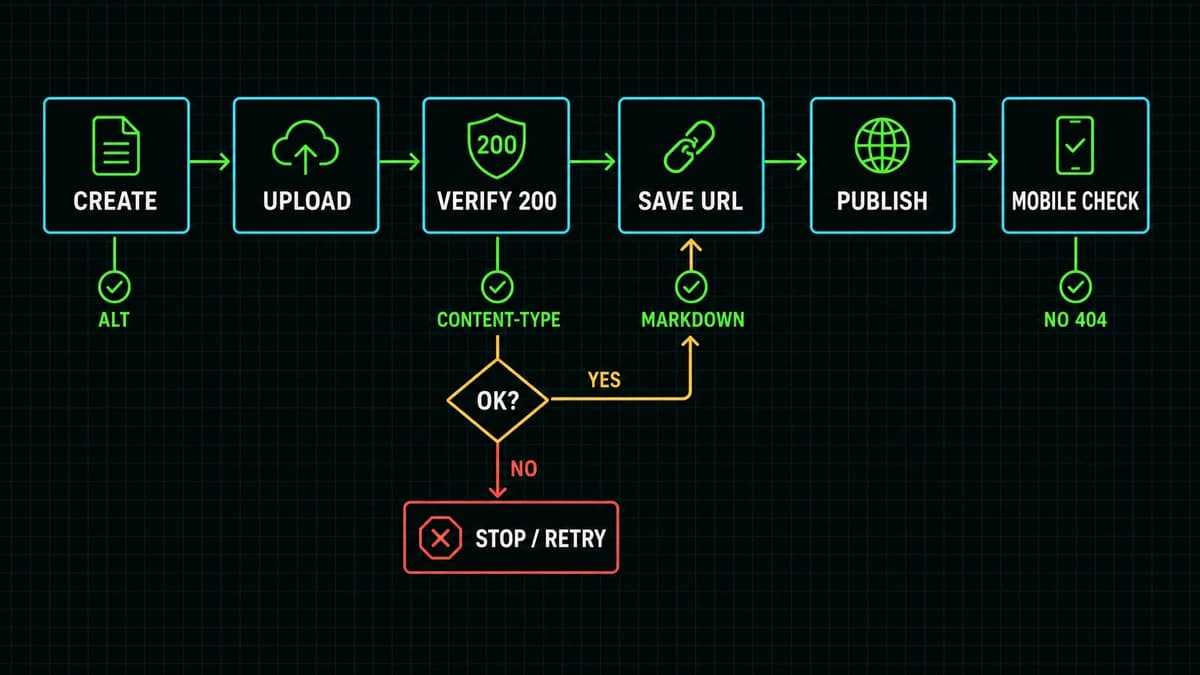
Verification flow for publishing an image-rich article
Use this sequence:
The administrator upload or Codex App Server generation succeeds and returns a temporary URL.
In an authenticated browser, GET the temporary URL directly and confirm 200 plus image/webp for a body image or image/png for a cover.
Check meaningful alt text and body-image spacing, or inspect the cover preview.
Save the post and confirm the URL was rewritten from tmp/ to MIME-preserving media/<sha256>.webp or .png.
GET the permanent URL directly and verify 200, Content-Type, and the public immutable cache policy.
Open the published article at desktop and mobile widths and check for 404, CSP, and image optimization errors.
An upload response of 200 is not enough if promotion fails during the later post save.
Do not publish when an intermediate stage failed, and preserve a readable text-only state where possible.
A success toast is not the completion criterion.
Dangerous shortcuts
Parsing an unauthenticated body before authentication
Trusting only Content-Length instead of measuring actual bytes
Storing an unverified source image directly in R2
Leaving a temporary URL in a published post
Saving the post and media references in separate database transactions
Overwriting one key while labeling it immutable
Deleting an object without checking live references
Allowing foreign image hosts with a wildcard
Declaring success without a direct GET and mobile rendering check
Image delivery is not a UI widget.
It is a small transaction system across authentication, storage, database state, caching, and rendering.
Separating temporary from permanent media, using content hashes and D1 references, and verifying the final HTTP response makes the CMS resilient as the media library grows.