No-Routes Worker Deploys: Verify the Active Version
# For no-routes version uploads, verify the traffic allocation after versions deploy and require the intended Worker version to reach 100% before completion.
What happened: do not stop at a successful deploy message
On July 24, 2026, I checked this blog's deployment helper against Cloudflare's current documentation.
By default, wrangler deploy creates a new Worker version and immediately deploys it to 100% of traffic.
Removing routes from the generated configuration does not turn that command into the upload-only wrangler versions upload command.
This project uses a restricted routine-deploy token that cannot modify its existing custom-domain route, so the helper removes only routes from the built configuration.
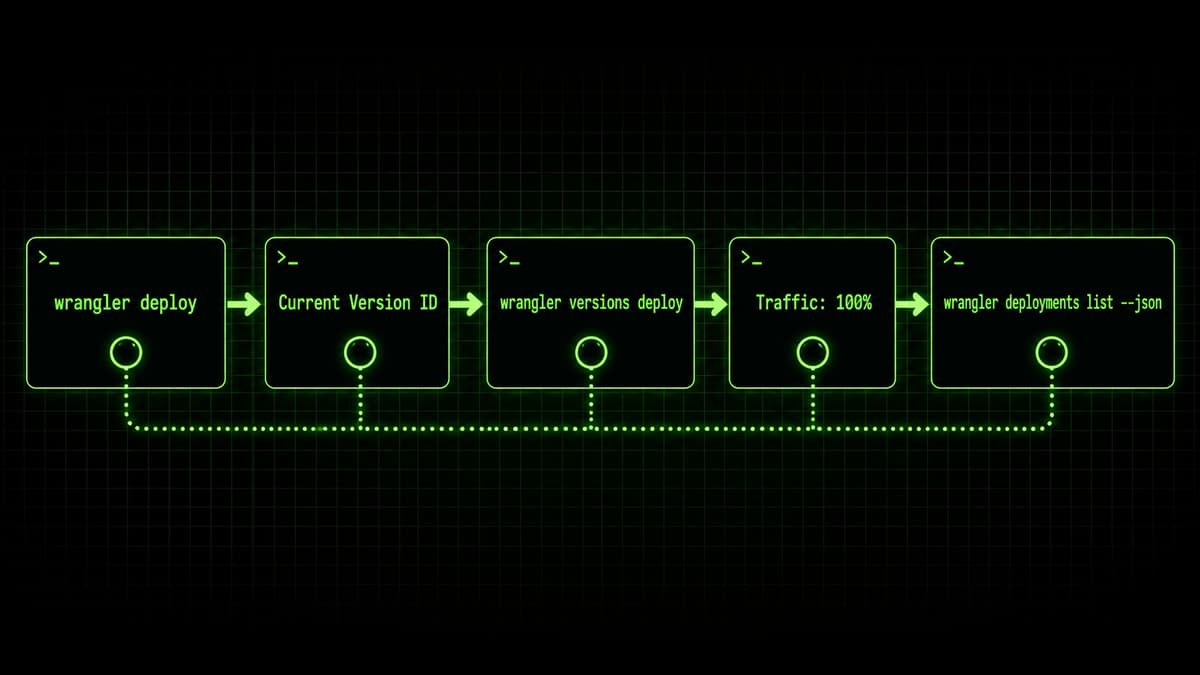
It then identifies the version returned by wrangler deploy, explicitly assigns that same ID to 100% with wrangler versions deploy, and checks wrangler deployments list --json.
That is a conservative project-specific procedure, not a claim that an ordinary wrangler deploy only uploads an inactive version.
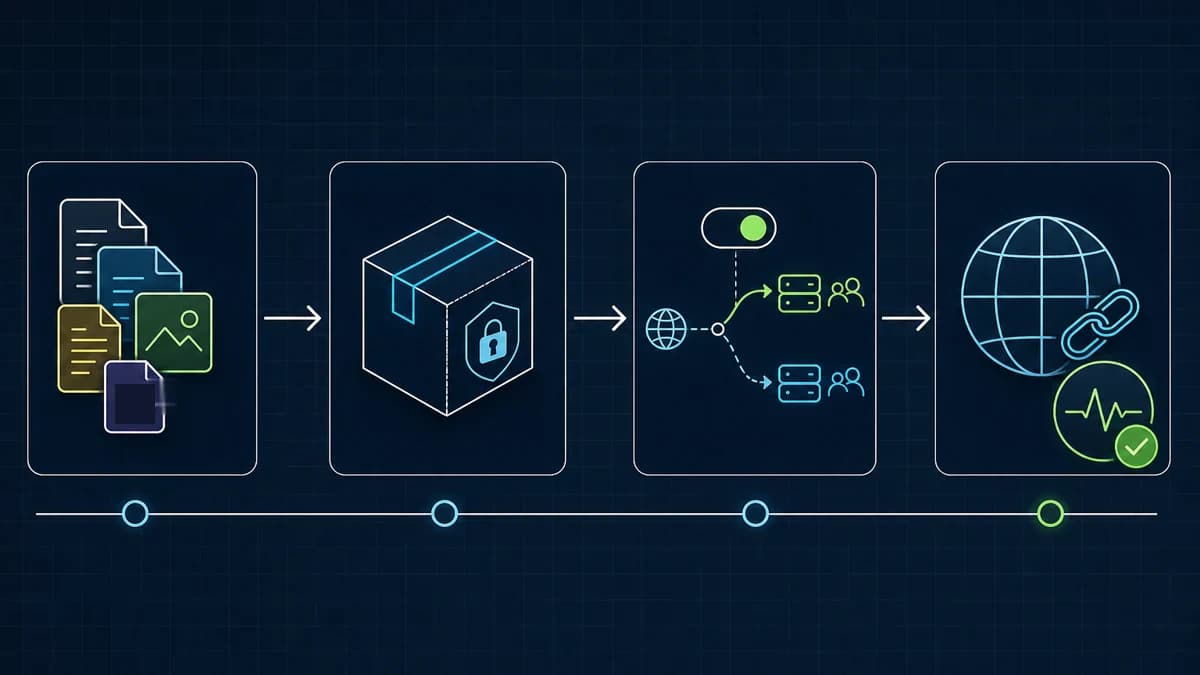
Sequence separating Worker deploy, version identification, 100% traffic verification, and a later HTTP check
*Diagram: Cloudflare deployment state and the live custom-domain response are separate evidence. This helper automates the deployment JSON check; live HTTP verification happens afterward.*
The helper's actual sequence
The production script also passes --config and --name, but its core sequence is:
bash
wrangler versions list --json # version set before deploywrangler deploy # create a version + deploy it at 100% by defaultwrangler versions deploy \ --version-id <ID> --percentage 100 --yeswrangler deployments list --json # verify the newest deployment
These flags match the Wrangler 4.94.0 CLI used by this project.
When upload and deployment must genuinely be separated, the documented upload-only command is wrangler versions upload.
Cloudflare also documents wrangler triggers deploy for changes to routes, domains, or cron triggers.
Version ID fallback: use a unique set difference, not "newest"
The helper first looks for Current Version ID: <uuid> in the human-readable wrangler deploy output and accepts only a strict UUID.
If that output changes, blindly taking the newest version is unsafe: a concurrent uploader could cause the helper to promote someone else's version.
The script saves wrangler versions list --json before deploy and reads it again only when the text ID is unavailable.
It accepts the unique set difference only when exactly one new valid UUID exists.
A zero-result or multiple-result delta fails closed rather than guessing.
js
function parseUploadedVersionId(beforeJson, afterJson) { const before = new Set( JSON.parse(beforeJson).map((entry) => entry?.id), ); const after = JSON.parse(afterJson); const created = after.filter( (entry) => isUuid(entry?.id) && !before.has(entry.id), ); return created.length === 1 ? created[0].id : null;}
Verifying 100% traffic: unverifiable means failed
A zero exit code from wrangler versions deploy is not the final proof.
The helper reads wrangler deployments list --json, sorts by creation time, and confirms that the target version appears in the newest deployment at 100%.
Malformed JSON, an empty deployment list, a missing ID, or a percentage other than 100 all fail.
This proves Cloudflare's deployment state, not what the custom domain currently returns.
The release workflow must still verify the production URL over HTTP and in a browser after deployment.
A log sanitizer is only a backstop
The helper filters stdout and stderr for emails, account IDs, known public identifiers, and environment-variable values before forwarding them.
A pattern-based sanitizer does not guarantee that arbitrary logs are safe: it cannot anticipate every credential or future output format.
The safer baseline is to avoid logging secrets, keep CI masking enabled, and run staged secret scanning; sanitization only reduces accidental exposure on top of those controls.
Takeaways
By default, wrangler deploy creates a version and deploys it to 100%
The documented upload-only command is wrangler versions upload
This helper explicitly reassigns the identified ID to 100% and verifies deployment JSON fail-closed
The fallback uses a unique set difference; zero or multiple new IDs stop the deployment
Deployment state and the live HTTP response require separate checks