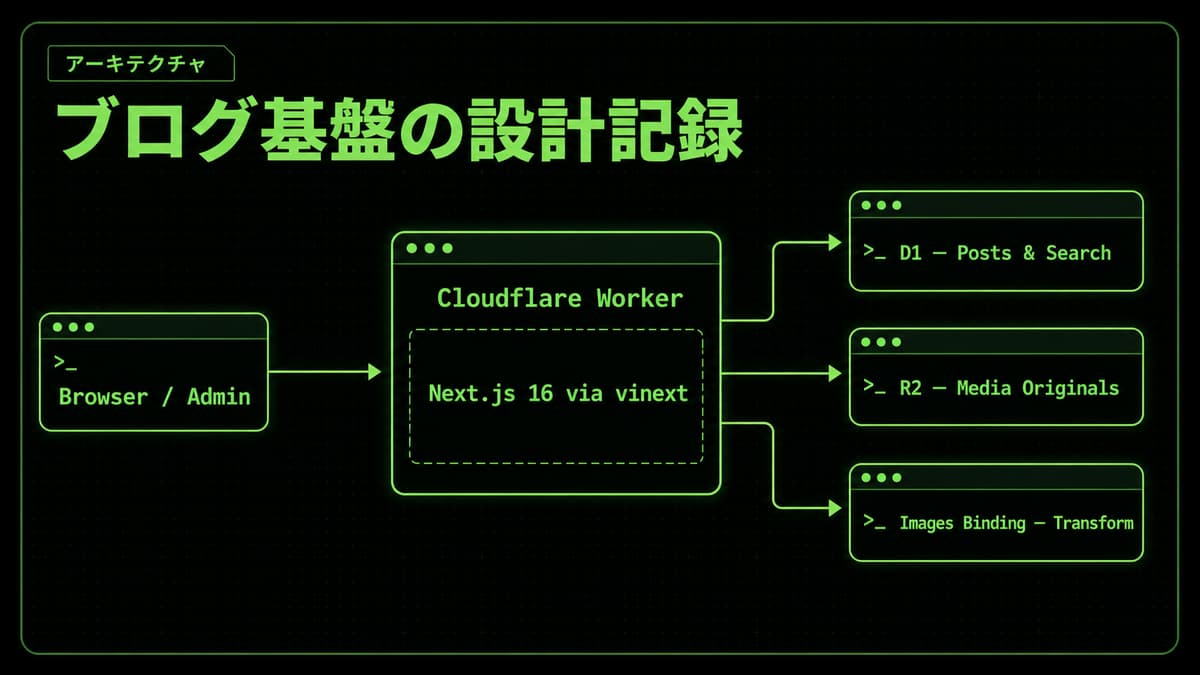
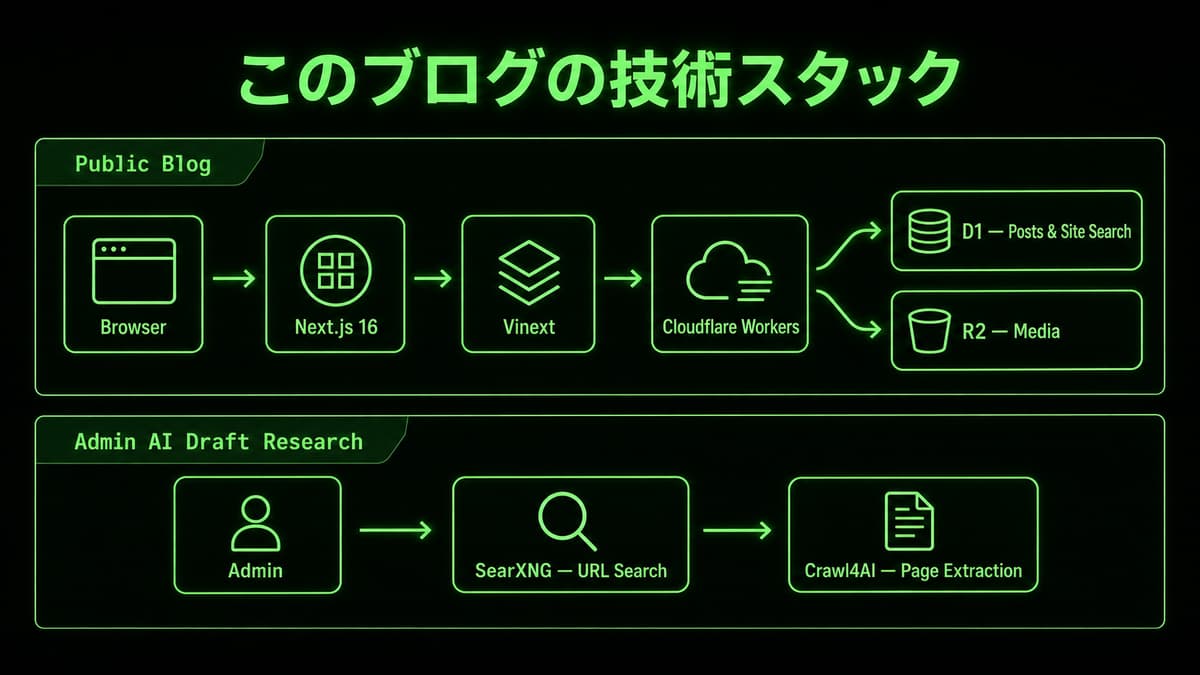
The public site and administrative APIs combine Cloudflare Workers, D1, R2, Cloudflare Images, and vinext.
Rather than calling the stack simple merely because it is serverless, this article maps each request to its binding and identifies where consistency is enforced.
Cloudflare Workers does not keep one Node.js process alive for this application.
As Cloudflare's runtime documentation explains, the code runs in a distributed V8 isolate.
Mutable module scope therefore cannot stand in for durable database state.
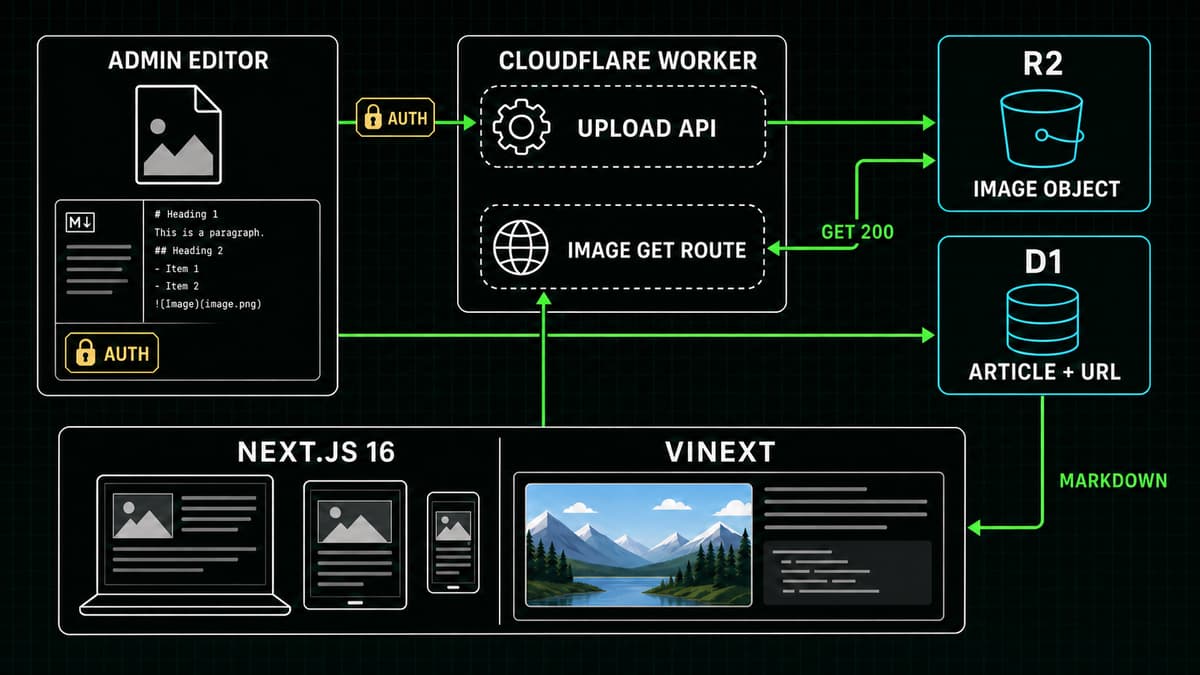
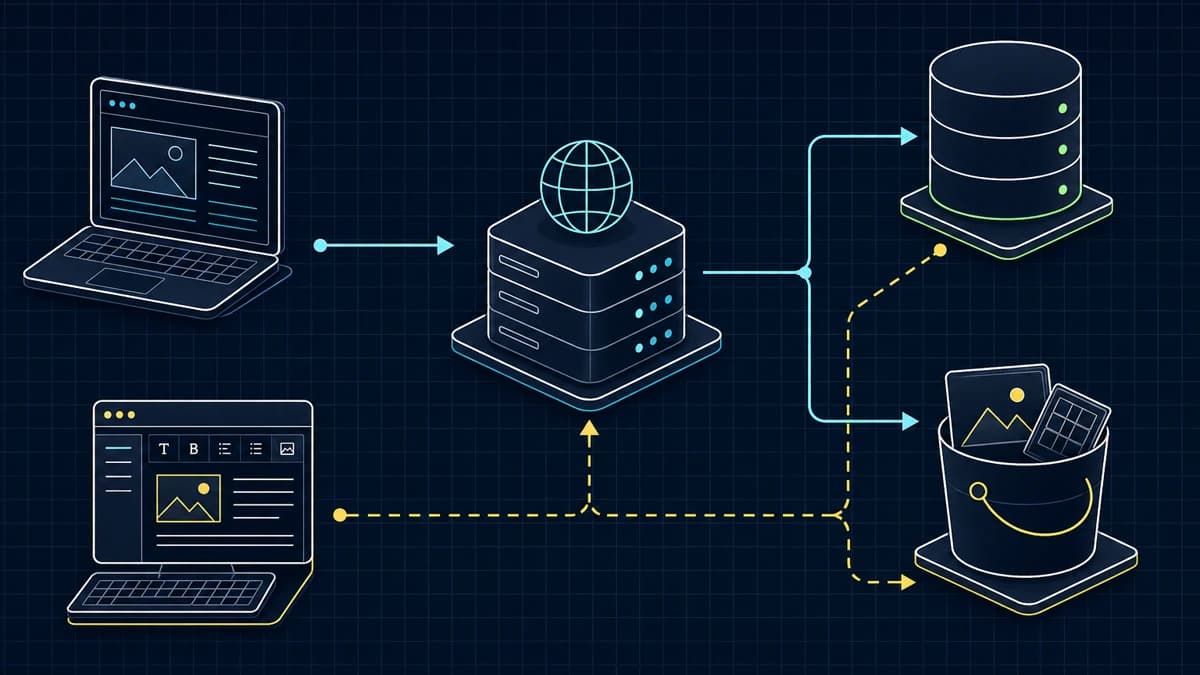
Blog data flow connecting reader and admin requests to an edge application, D1, and R2
*Diagram: public reads and administrative writes share the edge application while D1 rows and R2 objects remain separate responsibilities.*
Dynamic SSR, APIs, and /_vinext/image are handled by a single Worker deployment.
A matching static file can instead be served by Workers Assets before Worker code runs, so not every request necessarily enters the same JavaScript handler.
Both paths stay on the same origin, while D1, R2, Images, and email are called through bindings rather than public REST endpoints; the core browser flow therefore does not introduce cross-origin CORS.
The repository is not completely enclosed by one Worker, however.
Administrative web search depends on external SearXNG and Crawl4AI services, while AI generation is delegated through a Durable Object to a Codex container.
Hiding those boundaries would produce the wrong failure and deployment model.
Separate D1 auto-commit from transactions
Independent statements use auto-commit.
D1 batch() sends several statements in one call as a transaction; a failing statement aborts or rolls back the sequence.
This project batches media-reservation validation and consumption with metadata registration, and batches post persistence with search-index maintenance, when those writes must succeed together.
A read followed by a write in another request is not protected automatically.
An existing post update uses the timestamp read by the editor as a compare-and-swap precondition:
sql
UPDATE posts SET ... WHERE id = ? AND updated_at = ?
Zero changed rows means that another request updated or deleted the post.
The create-path INSERT ... ON CONFLICT DO UPDATE and the guarded update of an existing post do not provide the same concurrency guarantee.
The schema below is an abridged view of the real schema.
The first migration also includes cover, author, likes, and views; later migrations add bilingual columns such as title_ja and content_en, plus comments, FTS, and media-management tables.
sql
CREATE TABLE posts ( id TEXT PRIMARY KEY, slug TEXT UNIQUE NOT NULL, title TEXT NOT NULL, excerpt TEXT NOT NULL, content TEXT NOT NULL, tags TEXT NOT NULL DEFAULT '[]', status TEXT NOT NULL CHECK (status IN ('draft', 'published')), cover TEXT NOT NULL DEFAULT '', author TEXT NOT NULL, likes INTEGER NOT NULL DEFAULT 0, views INTEGER NOT NULL DEFAULT 0, created_at TEXT NOT NULL, updated_at TEXT NOT NULL);
Tags are stored as a JSON string.
At the site's current scale, the application can read and normalize only the tags values of published posts.
A larger dataset may justify a separate tag relation rather than pretending this choice is universal.
Layer the browser, Images binding, and R2 responsibilities
Before upload, the browser scales an image to at most 1600 pixels wide and chooses WebP quality 0.82 only when that output is smaller than the original.
This preprocessing reduces transfer size; it is not a security boundary.
The server then validates the declared MIME type against the actual byte signature and enforces the 5 MiB limit.
Regular inline article images are scaled down to 1600 pixels and encoded as WebP at quality 82 through the Images binding.
Article covers follow a separate contract: PNG input is cover-cropped and stored as a 1200 × 675 PNG, and the operation fails closed unless the transform response content-type and output signature both match.
It validates and consumes a previously created D1 storage reservation in the same batch() transaction that registers media metadata, then stores a temporary R2 object with private, no-store metadata.
Failure paths clean up the reservation, metadata, and R2 object.
For delivery, /_vinext/image reads a static source through Workers Assets or managed media through the same-origin API, then passes the bytes to the Images binding.
Cloudflare's binding documentation says that binding responses are not cached automatically, so any cache claim must be verified against the framework path and response headers actually deployed.
The design is therefore neither "trust whatever the browser compressed" nor "make the server do everything."
The browser reduces transfer size, the server validates and normalizes, D1 tracks metadata and quota, and R2 stores objects.
Read the vinext and Next.js versions from the manifest
This repository uses vinext—the Next.js API surface reimplemented on Vite—to run the App Router and Server Components.
The vinext README labels the project experimental and under heavy development, so this site does not assume complete Next.js compatibility.
In the current package.json, the Next.js canary version is exact, while vinext uses a ^ range.
The lockfile fixes the vinext version that is actually installed.
It would therefore be inaccurate to say that both packages are exact-pinned.
An upgrade review includes the lockfile diff, build, full test suite, local Worker HTTP checks, and a Wrangler dry run instead of trusting the semver range alone.
Do not mix build-time and runtime configuration
NEXT_PUBLIC_* values in the client bundle are build-time inputs.
D1 and R2 bindings and server secrets come from the runtime env object.
This project's server helper prefers a runtime string binding and falls back to process.env without checking the environment.
The repository uses that path for local development and tests, but the helper itself does not gate it on NODE_ENV:
Secrets belong in Wrangler secrets, bindings in Wrangler configuration, and client-visible values require verification in the built output.
Treat cost as a dated snapshot
The design targets operation within the relevant free plans, but this article alone does not verify account usage or billing status.
The billing dimensions are separate: Workers requests and CPU, D1 storage and rows read or written, R2 storage and operation classes, and Images unique transformations.
Pricing and limits can change, so the billing dashboard and current pricing pages—not a permanent claim that only the domain costs money—are authoritative.
Takeaways
Cloudflare Workers executes this code in V8 isolates, not one application process
Core dynamic paths share a single Worker deployment, static files may use Workers Assets, and optional AI/search features depend on other services
A D1 batch() transaction and a guarded write for cross-request concurrency solve different problems
Image responsibilities are split across the browser, Images binding, D1, and R2
The package manifest and lockfile reveal how versions are actually constrained
Build-time public values stay separate from runtime bindings and secrets