Google Search Console for Next.js: Ownership, Sitemap, URL Inspection
# Verify a Next.js blog in Search Console, submit its bilingual sitemap, inspect URLs, and read performance without treating submission as an indexing guarantee.
A page can load perfectly in a browser while Google has not yet discovered, crawled, or indexed its URL.
Even a successful ownership check in Search Console proves only that the operator controls the site.
Property scope, ownership, URL discovery, indexing, and search performance are separate stages.
This blog already has the pieces needed to publish a Search Console HTML tag and expose both Japanese and English URLs through a sitemap.
The setup becomes predictable once each stage has its own verification step instead of treating the green “Verified” message as the finish line.
The repository implementation and official documentation were checked on July 26, 2026.
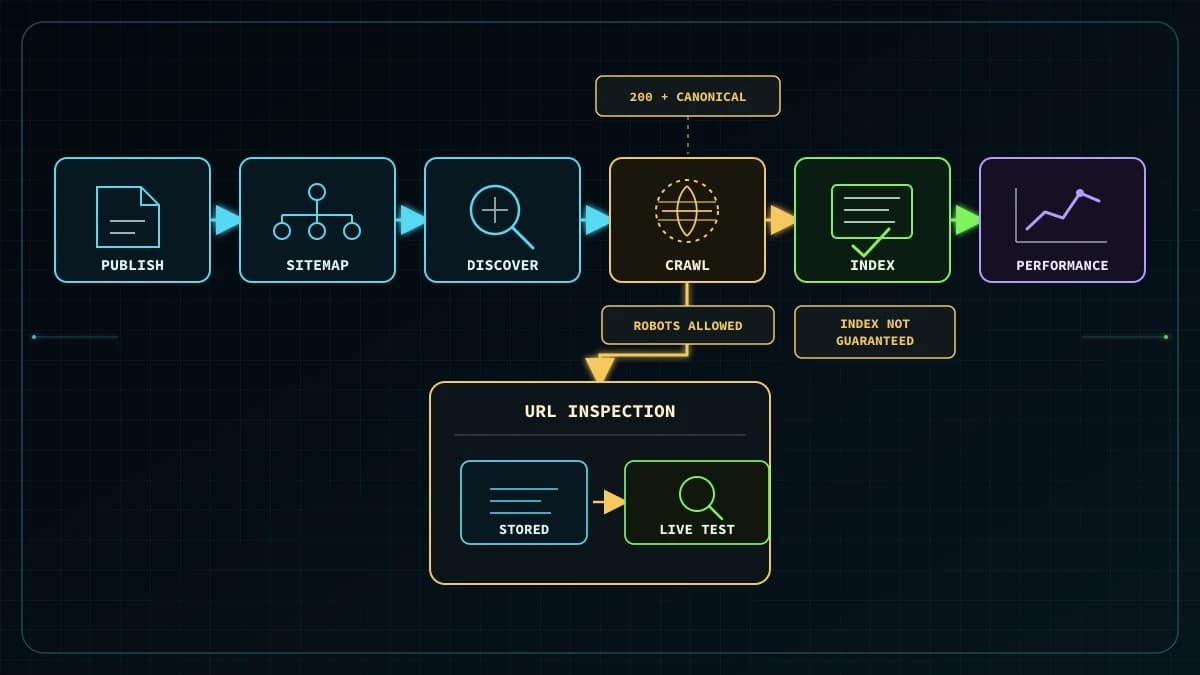
Flow from Search Console property verification through the bilingual sitemap, URL Inspection, and Performance reporting
*Diagram: verify control of the property, submit the location of the bilingual sitemap, inspect individual URLs, and observe actual search results in Performance.*
What ownership verification proves
Search Console ownership verification proves to Google that an operator controls a particular website property.
A verified owner receives the permissions needed to manage the property and submit a sitemap.
Finding the verification tag does not tell Google to index every page.
Google processes the ownership token, sitemap, crawl response, indexing directives, canonical signals, and content through different systems.
A new property can therefore be verified correctly while a newly published post is not yet visible in search results.
Treat the setup as four checkpoints:
Property scope: Decide which protocols, hosts, and paths belong in the Search Console view.
Ownership: Prove control with an HTML tag or a DNS record.
Discovery and inspection: advertise groups of URLs in a sitemap and examine individual URLs with URL Inspection.
Observed performance: use the Performance report for impressions, clicks, CTR, and average position.
Each checkpoint answers a different question.
No single status message proves that all four have succeeded.
Choose between URL-prefix and Domain properties
Search Console supports URL-prefix properties and Domain properties for websites.
They differ in both coverage and verification method.
A URL-prefix property includes only URLs that begin with the exact prefix, including its protocol.
For this blog, https://kirinnoblog.work/ covers the Japanese /ja/ routes and English /en/ routes under that HTTPS host.
It does not automatically include an HTTP version or another subdomain.
URL-prefix properties support the HTML tag verification method used by this repository.
A Domain property is entered as kirinnoblog.work, without a protocol or path.
It aggregates supported protocols, subdomains, and paths.
Search Console requires DNS record verification for a Domain property, so its verification wizard does not offer the application HTML tag as an alternative.
To use the existing google-site-verification output, create the https://kirinnoblog.work/ URL-prefix property first.
If the operator controls DNS and wants one view that also covers future subdomains, a Domain property can be verified separately through the DNS provider.
Creating both properties does not improve rankings.
It provides different scopes for administration and analysis.
Connect the verification token to the current Next.js implementation
After adding the URL-prefix property, choose HTML tag on the ownership verification screen.
The blog admin field expects only the value of the content attribute.
Pasting the entire element would place that entire string inside another content attribute, which would not match the value issued by Search Console.
Documentation, screenshots, and shared logs should use a placeholder such as search-console-verification-token, not a real token, email address, or account name.
The admin marketing panel has a Search Console 認証トークン field and a Search toggle.
The field updates searchConsoleToken, the toggle updates searchConsoleEnabled, and the save action persists the marketing settings.
In src/lib/marketing-settings.ts, getMarketingSettings() uses NEXT_PUBLIC_GOOGLE_SITE_VERIFICATION from the runtime environment as a fallback.
When saved marketing settings exist in production D1, those saved values and flags are merged over the fallback.
One managed source is enough.
If both the admin setting and the environment fallback are used, check which saved value is effective in production rather than assuming that a recent environment edit wins.
RootLayout in src/app/layout.tsx reads the settings and conditionally renders the tag in <head>:
An empty token or a false searchConsoleEnabled flag produces no tag.
When both conditions are satisfied, the shared root layout emits the same ownership tag for the Japanese and English routes.
There is no need to duplicate the verification element in article content or in a client component.
Verify the production HTML
Save the setting, then open https://kirinnoblog.work/ before clicking Verify in Search Console.
Use the browser’s page-source view, search for google-site-verification, and confirm that exactly one matching element appears inside <head>.
The admin preview and a local development server are not substitutes for the production URL that defines the property.
Check all of the following:
The homepage is available without authentication.
The name attribute is exactly google-site-verification.
The content attribute contains only the value issued by Search Console.
The tag is in <head>, not in <body>.
The protocol and host match the URL-prefix property being verified.
Return to Search Console and run verification only after these checks pass.
Google periodically checks that a verification method remains valid, so do not remove the tag or disable the saved setting immediately after verification.
A future layout change should include a regression check against the production HTML.
The verification string is intentionally visible in the public source and is not a login credential or API key.
That does not create a reason to copy a real token, email, or account identity into a tutorial.
Placeholders keep operational documentation reusable without leaking account-specific values.
Submit the bilingual sitemap
After ownership is verified, tell Search Console where the blog publishes its sitemap.
The production location is https://kirinnoblog.work/sitemap.xml.
The sitemap() function in src/app/sitemap.ts calls getPublishedPosts() and passes each published post to localizedSitemapEntries().
A post must have status set to published before it can appear in this generated sitemap.
A draft record is intentionally absent.
In src/lib/locale-seo.ts, localizedSitemapEntries() creates a Japanese URL and an English URL from the same slug.
Once this record is integrated into the canonical post data and published, the sitemap should contain both of these absolute URLs:
The same helper includes alternate mappings for ja-JP, en, and x-default.
Page metadata built by buildLocalizedMetadata() gives each localized page its own canonical URL and lists the other language as an alternate.
The English page is not canonicalized to the Japanese page.
The sitemap is also advertised by src/app/robots.ts through siteUrl("/sitemap.xml").
Before submitting it, open the production sitemap without signing in and confirm that it is fetchable, parses as XML, and contains the expected published URLs as fully qualified absolute URLs.
Select the correct property in Search Console, open Sitemaps, enter https://kirinnoblog.work/sitemap.xml, and submit it.
Submitting a sitemap tells Google where the public file is located.
It does not upload the file into Search Console.
A Success status means that Google fetched and read the sitemap.
Sitemap submission does not guarantee that every listed URL will be crawled or indexed.
Google’s sitemap documentation explicitly describes a sitemap as a discovery aid and says that not every item is guaranteed to be crawled and indexed.
Do not freeze the current submitted count or indexed count into this post.
Those values change as posts and Google’s processing state change, so they belong in the live Search Console report.
Inspect individual URLs
A sitemap advertises a set of URLs, while URL Inspection examines one fully qualified URL at a time.
Paste the Japanese URL or English URL into the inspection bar at the top of Search Console.
They are separate URLs, so inspect each one when validating a release or diagnosing a language-specific problem.
URL Inspection exposes information about Google’s indexed version and offers a live test of the currently published page.
Start with the indexed view to see whether Google knows the URL, the last reported crawl state, indexability information, and the Google-selected canonical.
Then run Test live URL to verify the current response, a successful page fetch, and the absence of indexing blockers.
The live test assesses whether the current page might be indexable.
It cannot predict which canonical Google will ultimately select.
That decision is shown only in indexed data under the Google-selected canonical field.
For this blog, the intended result is that each inspected locale URL declares itself canonical and points to the other locale as an alternate.
For a small number of newly published or substantially updated pages, use Request indexing after the live test succeeds.
The action asks Google to recrawl the URL.
There is a quota for individual requests, and repeating the request for the same URL does not make crawling faster.
Use the sitemap rather than repeated individual requests when many URLs need discovery.
Request indexing guarantees neither immediate appearance in search results nor eventual indexing.
Google states that crawling can take from a few days to a few weeks and that a crawl request may not lead to inclusion immediately or at all.
Record the action as a request, not as an indexing completion event, and revisit URL Inspection later.
Read the Performance report
Once pages begin appearing in search, use the Performance report to observe results on Google Search.
Its principal metrics are clicks, impressions, CTR, and average position.
Average position is the average position of the topmost result from the site for the selected view, not a simple average of every visible link position.
The table can group data by query, page, country, device, search appearance, and date.
A page filter that separates /ja/ from /en/ makes it easier to compare discovery and traffic for the two localized URL groups.
Always retain the date range and dimensions used for a decision.
A manual search from one browser does not have to match the report.
Search results vary with time, location, device, and recent user history.
This post therefore does not embed a current indexed-page count, click count, impression count, or ranking.
Those are changing operational measurements, not durable configuration facts.
Search Console measures visibility and clicks in Google Search.
Google Analytics 4 measures activity after a visitor reaches and loads the site, subject to that implementation’s collection rules.
Do not expect the two products to report the same number for different stages of the journey.
First compare the registered URL-prefix with the actual production URL, including protocol, host, and any path prefix.
An HTTP property does not match an HTTPS-only page, and a tag on an unrelated host does not verify the selected prefix.
Next inspect the source of the production homepage.
If the tag is absent, check the admin Search toggle, searchConsoleToken, and the saved marketing settings.
When the environment fallback is used, confirm that the deployment containing the NEXT_PUBLIC_GOOGLE_SITE_VERIFICATION change is the deployment serving production.
If the tag exists but verification fails, check whether the full HTML element was pasted into the token field.
Only the content value belongs there.
Also confirm that the tag is inside <head> and that the homepage is available without a login.
The Domain property does not offer an HTML tag
This is expected behavior, not a Next.js failure.
A Domain property is verified through a DNS record.
Add an HTTPS URL-prefix property to use the current application tag, or configure the record supplied by Search Console at the DNS provider to verify the broader Domain property.
Search Console cannot fetch the sitemap
Open https://kirinnoblog.work/sitemap.xml while signed out and check for authentication, redirect loops, or server errors.
The sitemap should contain complete absolute URLs on the intended production origin.
If the new post is missing, confirm that its record is published, that the slug is exact, and that updatedAt is a valid date consumed by the sitemap generator.
Look for both the Japanese and English URL rather than checking only one locale.
A successful sitemap status proves fetch and parse success.
It is not an indexing guarantee, so continue with URL Inspection for a missing individual page.
A page is not indexed
Read the indexed report and live test as different observations.
In the live test, check page fetch, crawl permission, any noindex directive, and the declared canonical.
In the indexed report, check Google’s selected canonical and the reported reason the URL was not indexed.
For localized posts, each page should canonicalize to itself and list fully qualified reciprocal alternate URLs.
Canonicalizing the English page to the Japanese page would conflict with this blog’s intended localized setup.
After fixing the actual cause, retest the small set of affected URLs and submit one indexing request if appropriate.
Repeated requests and sitemap resubmissions do not replace corrections to fetch errors, internal links, indexing directives, canonical signals, or content quality.
Performance has no visible data
Check the selected property, date range, search type, and page filters.
A URL-prefix property excludes protocols or subdomains outside its exact prefix.
Do not infer a technical outage from an empty table immediately after publication.
Use URL Inspection and the Sitemaps report to verify the technical stages, then monitor the current reporting window without copying transient totals into documentation.
Do not substitute a single manual-search position for the Performance report’s average position.
A previously verified property becomes unverified
Google periodically confirms that the verification token remains present and valid.
Check for a layout change, a disabled searchConsoleEnabled flag, a removed saved token, or a deleted DNS record.
When several owners verify the same property, do not overwrite another owner’s verification method.
Maintain an additional method when operational continuity requires it.
Operations checklist
Add the https://kirinnoblog.work/ URL-prefix property in Search Console.
Copy only the HTML tag’s content value into the admin field, enable Search, and save.
Confirm the meta tag in the production homepage <head> before verifying ownership.
Keep the verification method in place after verification succeeds.
After publishing a post, open /sitemap.xml and confirm both localized URLs.
Submit https://kirinnoblog.work/sitemap.xml in the Sitemaps report.
Inspect the Japanese and English URLs separately and request indexing only for the small number that need it.
Treat neither sitemap submission nor Request indexing as an indexing guarantee.
Record Performance date ranges and dimensions instead of embedding changing counts or ranks in the post.